
Quick summary
At a glance: common challenges
- Inconsistent staff deaf-awareness across a student’s own timetable
- Communication gaps accumulate into significant disadvantage over a semester
- Reliance on interpreters that may not always be available
- Social and informal exclusion beyond the classroom
At a glance: quick strategies
- Face the class, keep your face visible and well-lit
- Caption all video content and provide transcripts
- Repeat peer questions before responding
- Provide materials in writing as well as verbally
1. Introduction and Overview
Hearing impairment in higher education spans a wide spectrum, from mild or moderate hearing loss to profound deafness, and includes students who are late-deafened, hard of hearing, or deaf from birth. Communication preferences vary just as widely: some students rely on spoken language supported by lipreading and hearing technology, some use sign language as a first or preferred language, and many use a combination of methods depending on context. There is no single ‘deaf experience’ and no single accommodation that works for every student.
This chapter draws on published research into deaf students’ experiences of further and higher education, qualitative studies of assistive technology use, and established deaf-friendly teaching guidance, adapted here for the higher education context and for institutions in Uzbekistan where sign language provision, interpreter availability, and captioning infrastructure may be less developed than in the UK or US systems the underlying research was drawn from.
Why this matters
Across the research reviewed for this toolkit, one finding recurs more than any other: the barriers deaf and hard-of-hearing students face in higher education come overwhelmingly from how teaching and communication are organised, not from hearing loss itself. This reframes accessibility as an institutional responsibility rather than something an individual student must overcome.
2. Understanding the Disability
Terminology and spectrum
- Deaf (often capitalised ‘Deaf’) typically refers to individuals who identify with Deaf culture and may use sign language as a first language.
- Hard of hearing describes a degree of hearing loss, ranging from mild to severe, where some useful hearing remains, often supported by hearing aids.
- Deafened or late-deafened refers to people who lost hearing after acquiring spoken language, and who may not use sign language.
- Cochlear implants and hearing aids amplify or process sound but do not restore hearing to a ‘typical’ level; they do not eliminate the need for accessible communication practices.
Common misconceptions
- That all deaf or hard-of-hearing students can lipread reliably: lipreading captures only a fraction of spoken sounds, and many words look identical on the lips.
- That hearing aids or cochlear implants ‘fix’ hearing the way glasses correct vision: they help access sound but rarely restore full clarity, especially in noisy or group settings.
- That written English or the local written language is automatically as strong as a hearing peer’s: for students whose first language is a sign language, or who had delayed access to language in childhood, academic reading and writing may need additional support.
- That one accommodation (for example, an interpreter) meets every student’s needs: communication preferences are individual and should be confirmed directly with the student.
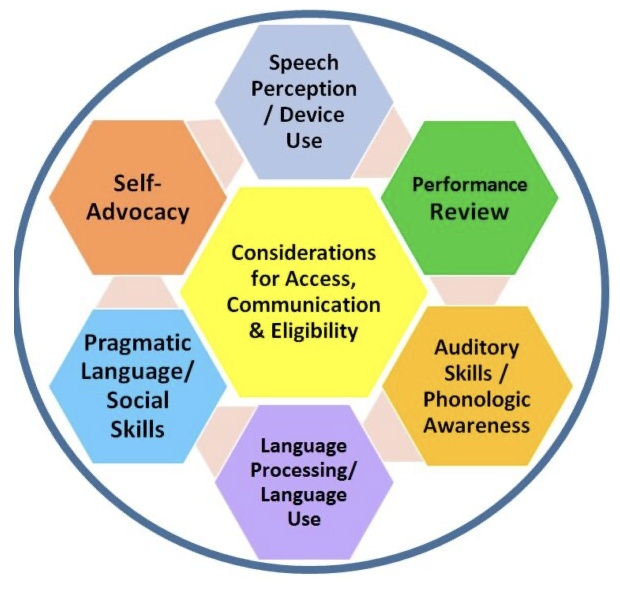
3. Common Challenges in Higher Education
Research into deaf students’ experiences of further and higher education (Hendry et al., 2021) found that communication was consistently identified as the single greatest challenge, more so than any specific academic content. Key patterns include:
- Inconsistent staff awareness: some lecturers adapt naturally and effectively, while others have little understanding of how deaf students access information, creating an unpredictable experience across a student’s timetable.
- Cumulative disadvantage: small gaps in communication (a missed comment, an unclear instruction) accumulate over a semester, and students often report needing to work harder than hearing peers simply to access the same information.
- Social and informal exclusion: barriers extend beyond timetabled teaching into corridor conversations, group work, and social life, contributing to isolation even when in-class support is adequate.
- Assumptions about literacy and language: staff sometimes assume that written communication is a sufficient substitute for spoken access, which does not hold for all students.
- Reliance on the student to flag problems: many students said they valued staff who checked in proactively, rather than waiting for the student to identify a problem after the fact.
4. Barriers Faced by Students
| Barrier type | What it looks like in practice |
|---|---|
| Academic / Learning | Fast-paced or unstructured lectures; multiple speakers talking over one another; lack of note-taking support; heavy reliance on spoken explanation of visual material. |
| Digital | Uncaptioned lecture recordings and videos; no transcripts; live online sessions without real-time captions; inaccessible video conferencing audio quality. |
| Communication | Staff speaking while facing the board or screen; poor lighting on the speaker’s face; background noise; group discussions with no turn-taking structure. |
| Social | Exclusion from informal peer conversation and networking; group work that defaults to rapid, overlapping speech; limited deaf-awareness among peers. |
| Assessment | Oral exams, vivas, or presentations without agreed adjustments; timed assessments that do not account for extra processing time; unclear or purely verbal exam instructions. |
5. Inclusive Teaching Strategies
Before class
- Share slides, readings, and key vocabulary in advance so students can prepare and reduce in-the-moment cognitive load.
- Ask the student directly about their communication preferences and any support they use — do not assume.
During lectures
- Face the class when speaking; avoid talking while writing on the board or looking at a screen.
- Use a microphone consistently, even in small rooms, if any assistive listening system is in use.
- Repeat or summarise questions and comments from other students before responding.
- Signal clearly when moving to a new topic and allow time to look at any visual aid before continuing to speak.
Group work
- Structure discussions with one speaker at a time and clear turn-taking, rather than open-floor debate.
- Consider smaller discussion groups and written discussion prompts as an alternative or supplement to spoken debate.
Practical sessions
- Position demonstrations so the student can see both the demonstrator’s face and the materials; avoid narrating with your back turned.
- Pair verbal instructions with written or visual step-by-step instructions.
Online learning
- Caption all video content and provide transcripts for recorded lectures.
- Enable and check live captions in video-conferencing tools rather than assuming they are switched on by default.
Assessment
- Agree adjustments for oral components in advance (for example, written alternatives or additional processing time).
- Provide exam instructions in written form even when also given verbally.
6. Classroom Accommodations
- Preferential seating that allows a clear view of the lecturer’s face and, where relevant, an interpreter or captioner.
- A horseshoe or circular seating layout for small-group teaching, so students can see multiple speakers.
- Sign language interpreters or real-time captioning (e.g., CART — Communication Access Realtime Translation) booked in advance for timetabled sessions.
- Peer note-takers or recorded lecture access, so the student is not trying to watch, listen, and write simultaneously.
- Extra processing time built into question-and-answer exchanges, both in class and in assessment.
- A named contact for the student to request adjustments or flag missed information without delay.
7. Digital Accessibility Considerations
- Caption every video and recorded lecture; auto-generated captions should be reviewed and corrected, not relied on alone.
- Provide full transcripts of recorded and live sessions in the learning management system.
- Use built-in live captioning in conferencing platforms for synchronous online classes, and confirm it is switched on before the session starts.
- Ensure the learning management system itself is navigable without relying on audio cues or notifications.
- Publish materials in advance, in a consistent, predictable location, so students are not dependent on verbal announcements alone.
8. Communication Guidelines
| Do | Avoid |
|---|---|
| Face the student directly and keep your mouth visible | Speak while facing a whiteboard, screen, or window with bright backlight |
| Speak at a natural pace and volume | Over-exaggerate mouth movements or shout, which distorts lip patterns |
| Repeat or rephrase what a peer has said before responding | Assume the student heard a classmate’s question or comment |
| Check understanding with a specific question | Ask a generic ‘does that make sense?’ and accept a nod as confirmation |
| Use written back-up for key instructions, dates, and changes | Rely on a single verbal announcement for important information |
| Ask the student directly about their preferred communication method | Assume every deaf or hard-of-hearing student uses the same method |
9. Environmental Adjustments
- Good, even lighting on the speaker’s face; avoid standing in front of bright windows.
- Reduced background noise where possible, including soft furnishings or carpeting to limit echo in teaching rooms.
- Hearing loop systems installed and clearly signposted in lecture theatres and seminar rooms.
- Quiet spaces available for concentration breaks, since listening and lipreading for extended periods is more fatiguing than typically assumed.
- Clear visual signage around campus to reduce dependence on audio announcements (for example, for fire alarms or building changes).
10. Assistive Technologies
| Technology | How and when it helps |
|---|---|
| Hearing loops / induction loop systems | Transmit sound directly to hearing aids or cochlear implants in a fitted room, reducing background noise interference. |
| FM and infrared assistive listening systems | Send the speaker’s voice directly to a receiver worn by the student, useful in large lecture theatres. |
| Live captioning tools (e.g., Otter.ai, Microsoft Translator, built-in platform captions) | Provide real-time text of spoken content in class or online; useful as a supplement, not a replacement, for other adjustments. |
| Video relay and remote interpreting services | Allow access to a sign language interpreter for one-off meetings or appointments where an in-person interpreter is not available. |
| Personal amplification devices | Support students with residual hearing in one-to-one or small-group settings. |
| Visual and vibrating alert systems | Provide alternatives to audio alarms and notifications, particularly important for building safety. |
11. Real-Life Example / Case Study
Case Study: A hard-of-hearing student in a large first-year lecture course
Aziza (a composite, illustrative example) is a hard-of-hearing student starting her first year on a large undergraduate course. In her first weeks, several lecturers speak while writing on the whiteboard, and one regularly presents in a lecture theatre with strong natural light behind them, making it difficult to see their face. Group seminars default to open, rapid discussion with several students speaking at once. Aziza does not raise the issue immediately, and by week four she is missing key deadline changes announced only verbally in class.
Poor practice
- Information about a coursework deadline change is announced verbally only, once, at the end of a lecture.
- Aziza is expected to identify and report each communication problem herself, lecture by lecture.
Inclusive practice
- The programme’s disability support contact arranges a short meeting with Aziza early in the semester to confirm her communication preferences and share them (with her consent) with teaching staff.
- Lecturers agree to post all deadlines and key announcements in writing on the course page, in addition to any verbal mention.
- The seminar tutor introduces a simple turn-taking structure for discussions and repeats peer questions before answering.
Lessons learned
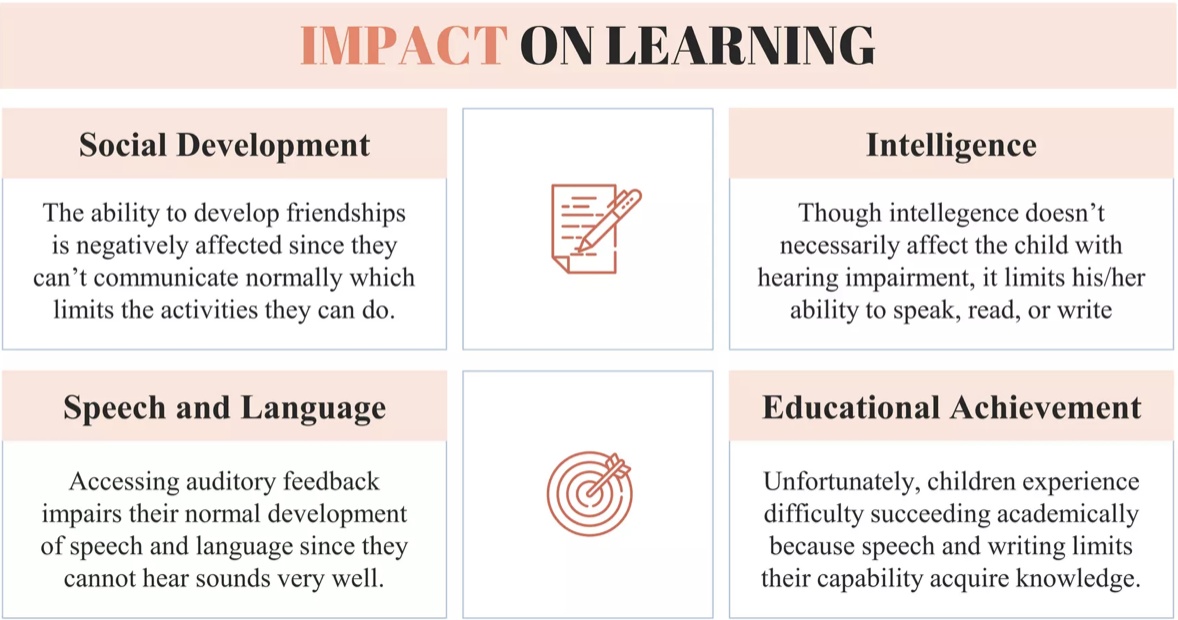
- Most of the barriers Aziza experienced came from routine teaching habits, not from any lack of available support — the fixes required no specialist equipment.
- A single early conversation and a written communication channel prevented the ‘cumulative disadvantage’ pattern seen repeatedly in the research.
12. Practical Scenarios
Scenario A
A deaf student asks you to caption a lecture recording that has already been uploaded without captions, one week before an exam. What do you do?
- Prioritise correcting auto-generated captions for that recording immediately, and check whether other uploaded recordings need the same review.
- Provide a written summary or transcript in the meantime if captioning cannot be completed same-day.
Scenario B
A group project includes a hard-of-hearing student, and the group has fallen into talking over one another. What do you do?
- Introduce a simple structure (one speaker at a time, a visual cue to indicate whose turn it is) for the whole group, framed as good practice for everyone rather than singling out one student.
Scenario C
An interpreter booked for a seminar cancels at short notice. What do you do?
- Offer an immediate alternative such as a remote captioning or interpreting service, and follow up afterwards with written notes or a recording so no content is lost.
13. Do’s and Don’ts
| Do | Don’t |
|---|---|
| Ask the student about their communication preferences directly | Assume all deaf or hard-of-hearing students communicate the same way |
| Caption all video content and provide transcripts | Rely on auto-captions without checking accuracy |
| Provide key information in writing as well as verbally | Make important announcements only once, verbally |
| Face the student when speaking, in good light | Talk while facing away or standing in front of a bright window |
| Build in regular, proactive check-ins | Wait for the student to report every problem |
14. Lecturer Checklist
- Have I asked the student about their communication preferences and any agreed adjustments?
- Are all videos and recordings I use captioned, with captions checked for accuracy?
- Do I face the class and keep my face visible and well-lit when speaking?
- Do I use a microphone consistently where assistive listening systems are installed?
- Do I repeat or summarise other students’ questions before responding?
- Are key announcements, deadlines, and changes also provided in writing?
- Have I built in a structure for turn-taking in group discussions?
- Have I shared slides and materials in advance of the session?
15. Student Support / Disability Services Checklist
- Has the student’s preferred communication method and support needs been documented and shared (with consent) with relevant staff?
- Are interpreters or real-time captioners booked in advance for all timetabled sessions, with a contingency plan for cancellations?
- Is a hearing loop or assistive listening system available and tested in teaching rooms the student uses?
- Has the student been offered a named contact for raising communication issues quickly?
- Are exam and assessment adjustments agreed and documented ahead of assessment periods, not arranged at the last minute?
- Is there a proactive check-in scheduled during the semester, rather than only responding to reported problems?
16. Quick Reference Guide
One-page summary
17. Key Takeaways
- Communication is the central accessibility issue for deaf and hard-of-hearing students in higher education — more so than any specific academic content.
- Barriers accumulate from routine teaching habits rather than isolated incidents, so consistency across all staff matters as much as any single accommodation.
- There is no single ‘right’ accommodation: communication preferences are individual and should be confirmed directly with each student.
- Technology (captioning, hearing loops, live transcription) is most effective when combined with staff who understand how and when to use it — technology alone does not guarantee inclusion.
- Practices that support deaf and hard-of-hearing students — captioning, written back-up of key information, structured turn-taking — benefit multilingual, neurodivergent, and hearing students as well.
18. References
Hendry, G., Hendry, A., Ige, H., & McGrath, N. (2021). ‘I was isolated and this was difficult’: Investigating the communication barriers to inclusive further/higher education for deaf Scottish students. Deafness & Education International, 23(4), 295–312. doi.org/10.1080/14643154.2020.1818044
Papadopoulos, K., Koustriava, E., Isaraj, L., Chronopoulou, E., Manganello, F., & Molina-Carmona, R. (2024). Assistive Technology for Higher Education Students with Disabilities: A Qualitative Research. Digital, 4(2), 501–511. doi.org/10.3390/digital4020025
Krasavina, Y. V., Serebryakova, Y. V., Ponomarenko, E. P., & Zhuykova, O. V. (2019). Based Teaching of Hearing-Impaired Students. ARPHA Proceedings, 1, 1789–1801.
National Deaf Children’s Society. Deaf-friendly teaching guidance (secondary and further/higher education adaptations).
CAST (2024). Universal Design for Learning Guidelines. udlguidelines.cast.org
WebAIM. Web accessibility guidance. webaim.org
W3C Web Accessibility Initiative. Web Content Accessibility Guidelines (WCAG). www.w3.org/WAI/standards-guidelines/wcag/
Sourcing note
Sections 1–4 and parts of 5, 7, 10, and 18 are synthesised directly from the research and persona material supplied. Sections 6, 8, 9, 11, 12, 13, 14, 15, and 16 have been newly drafted for this chapter to complete the standardised 18-part structure, using evidence-based practice consistent with the cited sources; these additions are noted here for transparency and should be reviewed by the project team.